| |
 |
EMAILS: All your old emails, including attachments
are stored on your pc. Preventative medicine speeds up the use of
Outlook, or your mail client.
How To Remove this data for good: Go through your Outlook Express mail box,
or AOL Inbox/Old Email, delete any emails you don't really need to keep.
Once deleted, go to your deleted items folder and delete them all
again. (OUTLOOK EXPRESS USERS). You can set Outlook to automatically
empty your delete items folder.
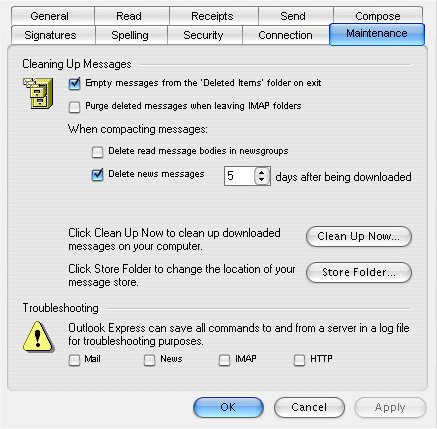
Click on TOOLS, OPTIONS, click on
MAINTENANCE tab, tick box "Empty messages from 'Deleted
Items' folder
on exit" click OK. |
It looks
like this:
|
|
Temporary Internet Folder. A little known folder
is stored on your PC, the folder contains all data and information
you've looked at in Internet Explorer, or your web browser, this
includes cookies, cookies are information files with data
pertaining to the sites you have visited. i.e. Ebay, Amazon, your
computer holds a track of your activity. This data such as larger files,
i.e. music, photos, movies, javascript, flash macromedia files are stored on your pc taking up valuable space
and is slowing down your web browsing. It also stores usernames and
password if you have confirmed you wish them to be stored on entering a
site with this type of login facility. |
HOW TO DELETE THESE FILES:
Select, START, All
Programs, Accessories.
This will appear:
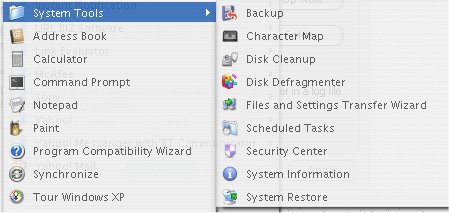
Select
Disk Cleanup.
This will
appear:
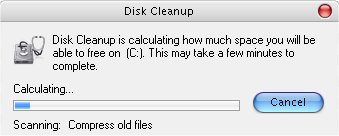
W A I
T........
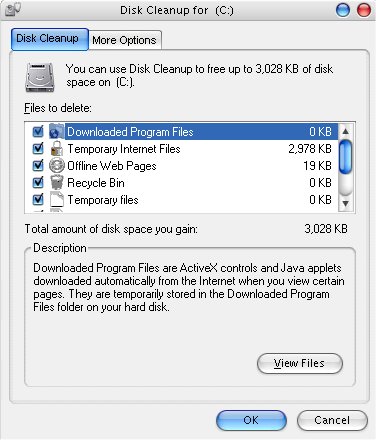
This will
appear
|
|
Make sure all the tick boxes are ticked. This
feature will delete the following: Temporary Internet Files, Recycle
Bin, Installation Files, Temp Folder files, Compressed Old Files. |
|
|
Click OK. All files will automatically deleted. |
.oOo.oOo.oOo.oOo.oOo.oOo.oOo.oOo.oOo.oOo.oOo.oOo.oOo.oOo

|
|
INFO: Your system is basically made up of data,
usually scattered about one disk. When you click on a file or run a
program, Windows needs to find that program on the disk, and the time it
takes to find that file depends on how much fragmentation of your data
is on the disk. Windows provides a tool called Disk Defragmenter.
This utility re-indexes your files and makes it easier for windows to
find your files as they are cleverly shelved on your disk in other
words. |
|
|
How To Run Defrag: IMPORTANT, Close all programs down
first before Defrag. |
|
|
Select Start, Select All
Programs, Select Accessories |
This will appear:
Select, Disk Defragmenter,
then, Select Drive, i.e. C:\
This will appear:
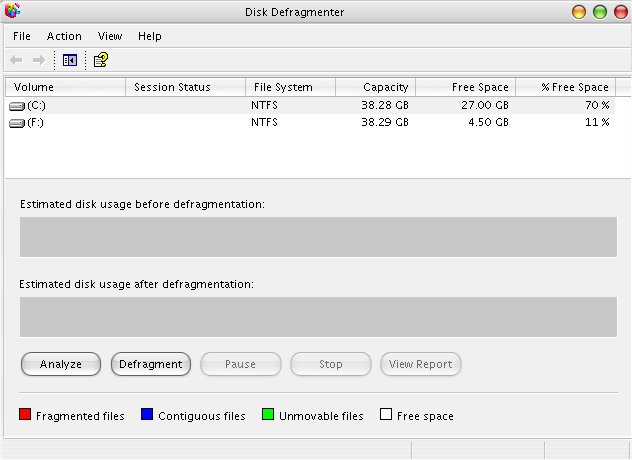
Click Defragment
WAIT !! until process
has finished, which can take a long time depending on the amount of
fragmentation.
|