
CHOOSE:-> | Main Menu | Maintenance | Backup | Tweaks | Faster Surfing |Windows Anti-Spyware |Windows Media Player 10 |Free Antivirus Checker
˙
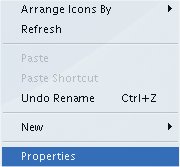
This will appear:
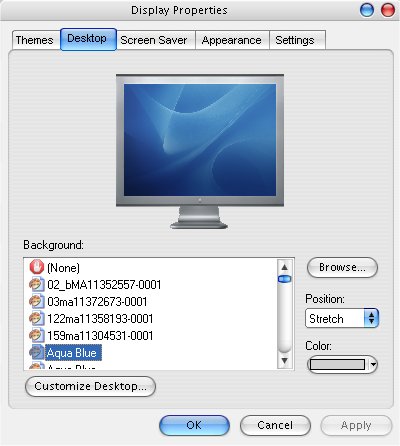
Select Properties, Select Desktop Something similar to this will appear.
Select [none] Click Apply Then, Select Screen Saver, this will appear:
From the drop down list of screensavers, Select [none] Click Apply, then OK You have now removed 2 components which will now increase your memory capacity to use with other programs. |
CHOOSE:-> | Main Menu | Maintenance | Backup | Tweaks | Faster Surfing |Windows Anti-Spyware |Windows Media Player 10 |Free Antivirus Checker
See also Software Tools
|
If you have any questions about certain aspects of Windows XP
you want to ask, email
techsupport@dofcom.co.uk - or email SITE UPDATE mailing list :
helpcentre@dofcom.co.uk to be
informed when new features have been added.
|
.oOo.oOo.oOo.oOo.oOo.oOo.oOo.oOo.oOo.oOo.oOo.oOo.oOo.oOo
Brought you by Dofcom Media © 2005. An Image Production. All rights reserved. Windows XP™ is copyright of Microsoft™ Corporation