| |
 |
Info: Imagine the scenario,
you've never done a backup of your files ever. Your system crashes,
major style, and you have to reformat and re-install Windows XP and all
the other programs you currently have on your system, all of your data
on your pc, or My Documents will have been deleted. So, with
that, there are various forms of Backup you can do. |
|
|
Backup To Floppy disk (1.44Mb capacity): This
is a very easy task, and also handy for lots of smaller files such as
photographs or letters you have written. You can name the disks
individually and file them for future reference. |
|
|
How To Backup to floppy: Insert a
blank disk in to drive A: Go through your My Documents
folder, right-click over any file you wish to save, and click Send
To This will appear

Select 3
½ Floppy
Your transfer will start and the file will be copied
to floppy disk. If you get an error message saying disk full,
this indicates that there is not enough room on the disk, or the file
you have chosen is too large for the disk, if this is the case, you will
have to use the CD-RW option, if you have a cd re-writer that is. |
|
|
Backup To CD-RW: (CD-Writer). Much the same
process, although you choose the CD-RW option instead of
3 ½
floppy.
Insert a blank CD-R in to your CD-R drive and follow the same
instructions as above. You can store hundreds of files on CD-RW. |
|
|
Use Windows Backup: Little do you know, Windows
comes with its own Backup service. Its selects all the files you
want to backup and does the rest for you automatically. This option is
only really best for using CD-RW, as it will backup everything in to one
file. If you ever need to restore the files, run Backup again to
Restore your files.
|
|
|
How to Run Windows Backup: Click on Start, select
All Programs, Select
Accessories. |
This will appear
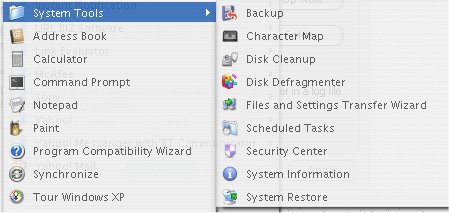
Select, BACKUP, this
will appear:
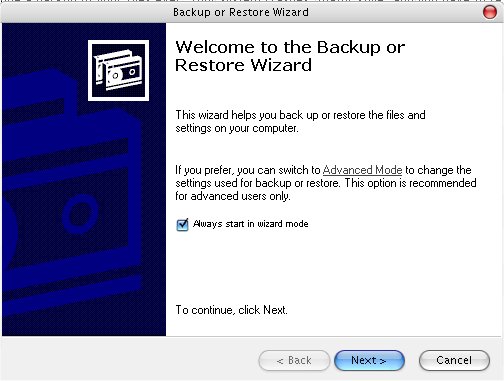
Follow the on screen
instructions.
|