

CHOOSE:-> | Main Menu |
PC Maintenance | Backup |Faster Surfing |Tweaks|Tools |Windows Anti-Spyware |Windows Media Player 10 |Free Antivirus CheckerInternet Explorer & (AOL Users) comes with its own windows default settings, but these can be tweaked, very easily, and help speed up your surfing. Plus, with a little housekeeping now and again will also help to speed up your surfing.
CLEAR HISTORY:
Click on Internet Explorer (AOL: Click Safety, then Settings)
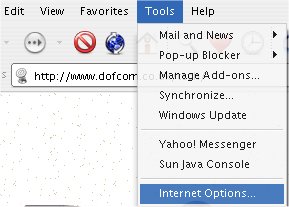
Click on Tools, Internet Options (AOL: Click "Internet Web Browser Settings, then click INTERNET EXPLORER SETTINGS link)
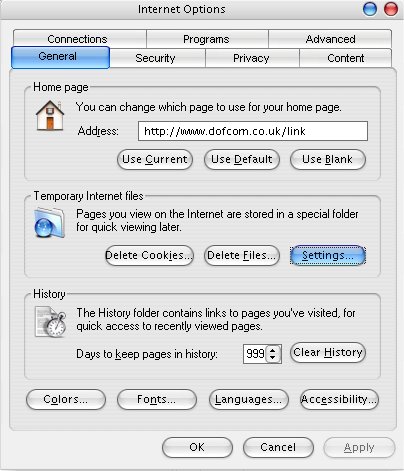
Click on Delete Cookies
W A I T !!
Then, Click Delete Files
W A I T !!
Click on PROGRAMS
At the bottom, make sure there is no TICK in the box where it says "Internet Explorer should check to see......." - Unticking this box will speed up the time it takes to load Internet Explorer. It does not need to check itself when you load up Internet Explorer.
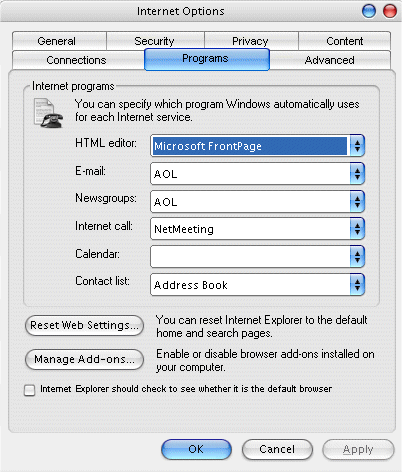
Click OK
More tips to follow......
Also, some software is available via the net called, available
from DOFCOM -
Internet Explorer Blaster - View and erase individual cookies in your
browser. Also view and clean your website browsing history so others can't see
where you've been! Get this software
CHOOSE:-> | Main Menu | Backup |Maintenance |Tools |Windows Anti-Spyware |Windows Media Player 10 |Free Antivirus Checker
See also Software Tools
|
If you have any questions about certain aspects of Windows XP
you want to ask, email
techsupport@dofcom.co.uk - or email SITE UPDATE mailing list :
helpcentre@dofcom.co.uk to be
informed when new features have been added.
|
.oOo.oOo.oOo.oOo.oOo.oOo.oOo.oOo.oOo.oOo.oOo.oOo.oOo.oOo
Brought you by Dofcom Media © 2005. An Image Production. All rights reserved. Windows XP™ is copyright of Microsoft™ Corporation